Section 17.3
Wires and Wiring
This section contains recommendations and requirements for the VIH and EH connectors and wiring.
Section 17.3.1
General Wire Recommendations
Detroit Diesel Corporation recommends color coding or hot stamping of wires.
Note: Color code the wires as shown in the schematics. If the wires used are the same color, hot stamp the cavity number on the wires.
NOTICE: |
|
DDC does not recommend using any type of terminal lubricant or grease compounds. These products may cause dirt or other harmful substances to be retained in the connector. |
NOTICE: |
|
Insulation must be free of nicks. |
Tape, conduit, loom or a combination thereof must be used to protect the wires. Refer to sections "17.4 Conduit and Loom" and "17.5 Tape and Taping" . All wires must be annealed copper wire (not aluminum). All wires must comply with SAE J1128 JAN 95 Low Tension Primary Cabl e. Contact the Society of Automotive Engineers to obtain the documents.
Section 17.3.2
Terminal installation and Removal
The method of terminal installation and removal varies, depending on the terminal/connector design. No other terminals are to be removed or installed on the Engine Harness.
Section 17.3.2.1
Wire and Terminal Installation - Tyco ECM/ECU Connector
To install the wires and terminals into the Tyco connector:
- Remove the Terminal Position Assurance (TPA) from the connector using a jewelers (small) screwdriver (see Figure "Removing the Terminal Position Assurance" ).
- Push the terminal into the cavity until it clicks.
- Replace the TPA.
- Secure the harness in the shroud neck with two tie wraps (see Figure "Tyco Connector and Locking Tabs" ).
Note: The conduit must cover the harness wires in the neck of the shroud.
Section 17.3.2.2
Wire and Terminal Removal - Tyco ECM/ECU Connector
Use a jewelers (small) screwdriver as your extraction tool. To remove the terminals from the connector body:
- Cut the tie wraps holding the harness in the neck of the shroud.
- Remove the connector from the shroud by pushing the four locking tabs (arrows) back from the connector. Use the screwdriver to push back the tabs closest to the shroud wall (see Figure
"Tyco Connector and Locking Tabs"
).
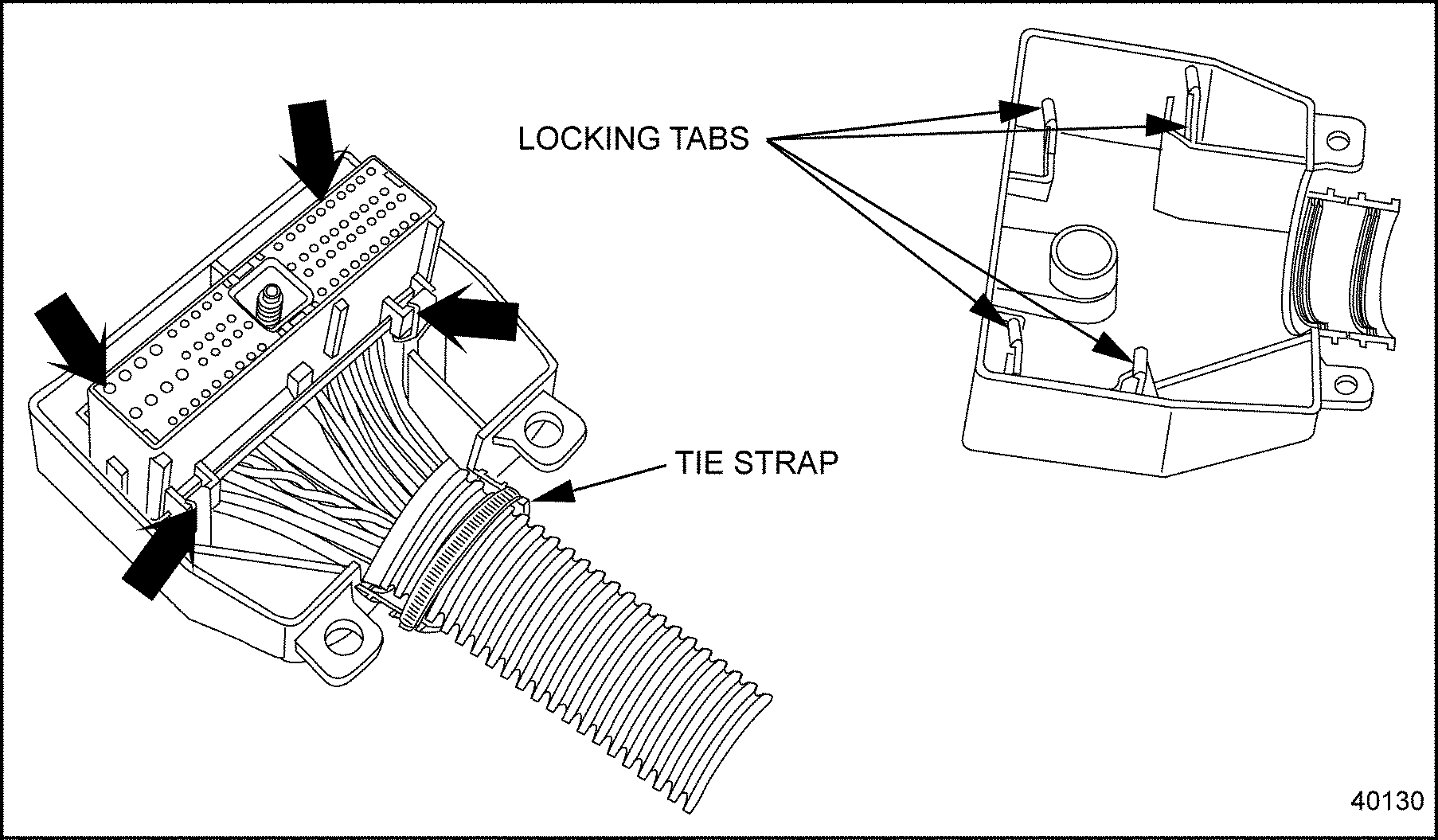
Figure 1. Tyco Connector and Locking Tabs
- Use the screwdriver to remove the Terminal Position Assurance (see Figure
"Removing the Terminal Position Assurance"
).
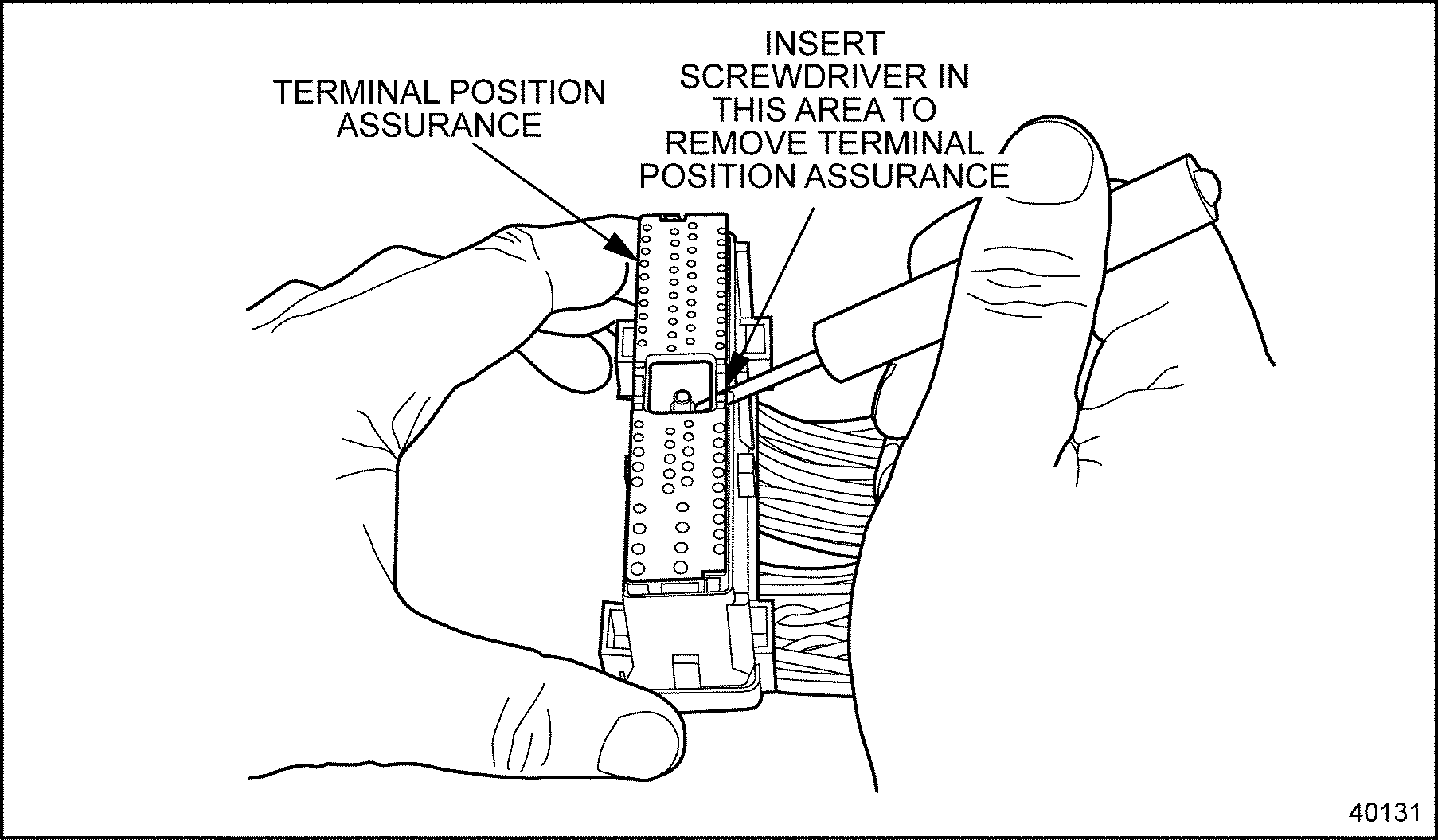
Figure 2. Removing the Terminal Position Assurance
- Use the screwdriver to gently pry back the tab holding the terminal (see Figure
"Removing the Terminal"
).
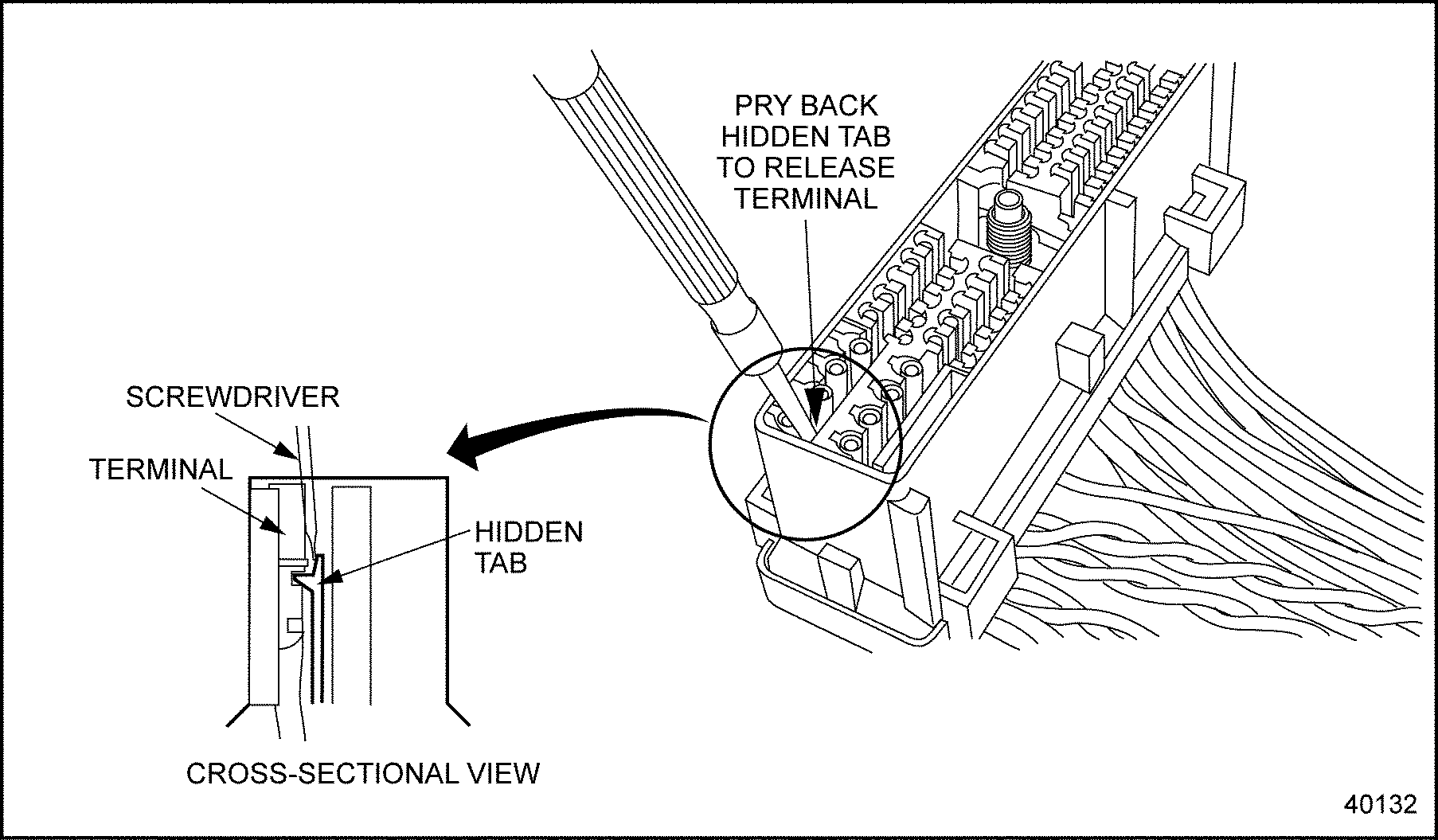
Figure 3. Removing the Terminal
- While holding the tab back, carefully pull the wire and terminal out of the connector.
Section 17.3.2.3
Deutsch Terminal Installation Guidelines
Deutsch connectors have wire seals molded into the connector. These connectors are push-to-seat connectors with cylindrical terminals.
NOTICE: |
|
Improper selection and use of crimp tools have varying adverse effects on crimp geometry and effectiveness. Proper installation of terminals require specialized tools. Do not attempt to use alternative tools. |
The crimp tool to use in Deutsch terminal installation is J 34182 (Kent-Moore part number).
NOTICE: |
|
Terminal crimps must be made with the Deutsch crimp tool P/N: HDT-48-00 to assure gas tight connections. |
NOTICE: |
|
If a separate seal is required, be sure to install the seal onto the wire before stripping the insulation. |
Use the following instructions for installing Deutsch terminals:
- Strip approximately 1/4 in. (6 mm) of insulation from the wire.
- Remove the lock clip, raise the wire gage selector, and rotate the knob to the number matching the gauge wire that is being used.
- Lower the selector and insert the lock clip.
- Position the terminal so that the crimp barrel is 1/32 of an inch above the four indenters. See Figure
"Setting Wire Gage Selector and Positioning the Terminal"
. Crimp the wire.
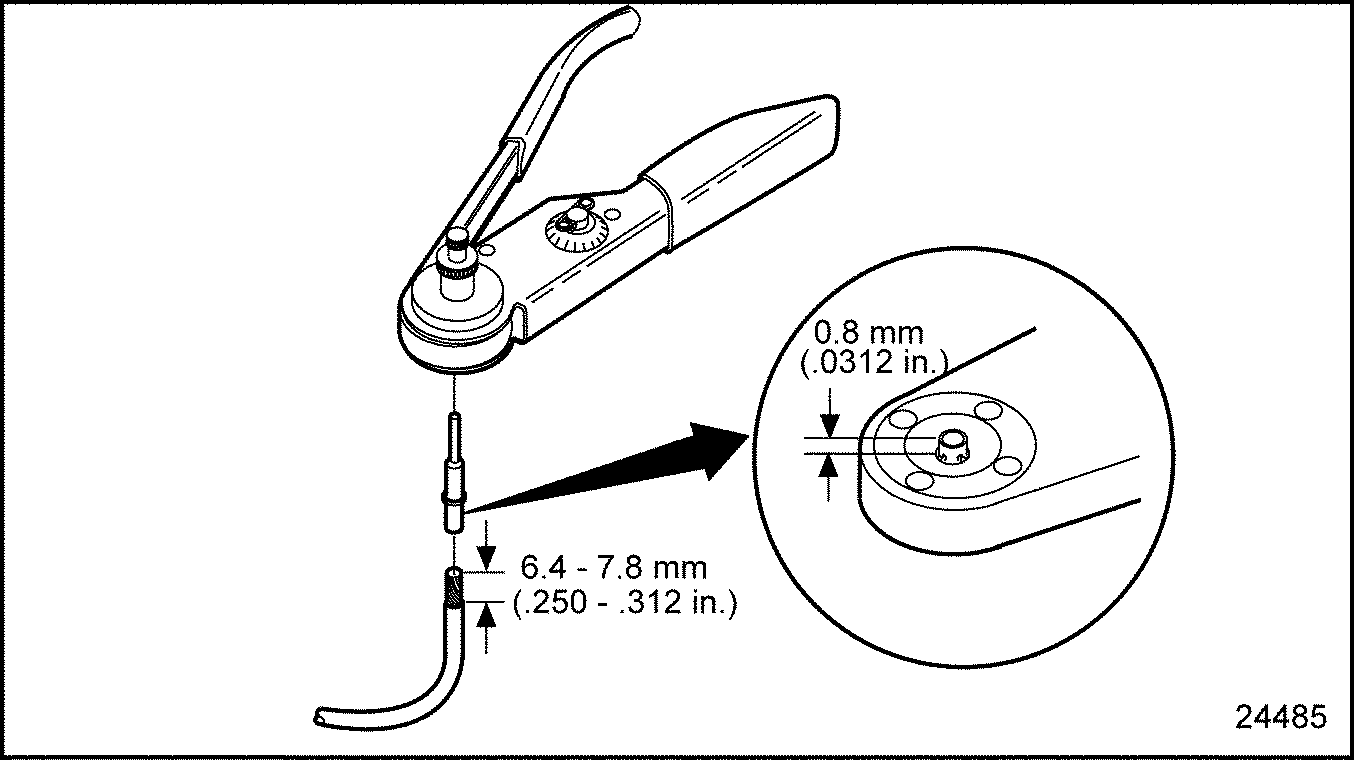
Figure 4. Setting Wire Gage Selector and Positioning the Terminal
- Grasp the terminal approximately one inch behind the terminal crimp barrel. Hold the connector with the rear grommet facing you. See Figure
"Pushing Terminal Into Grommet "
.
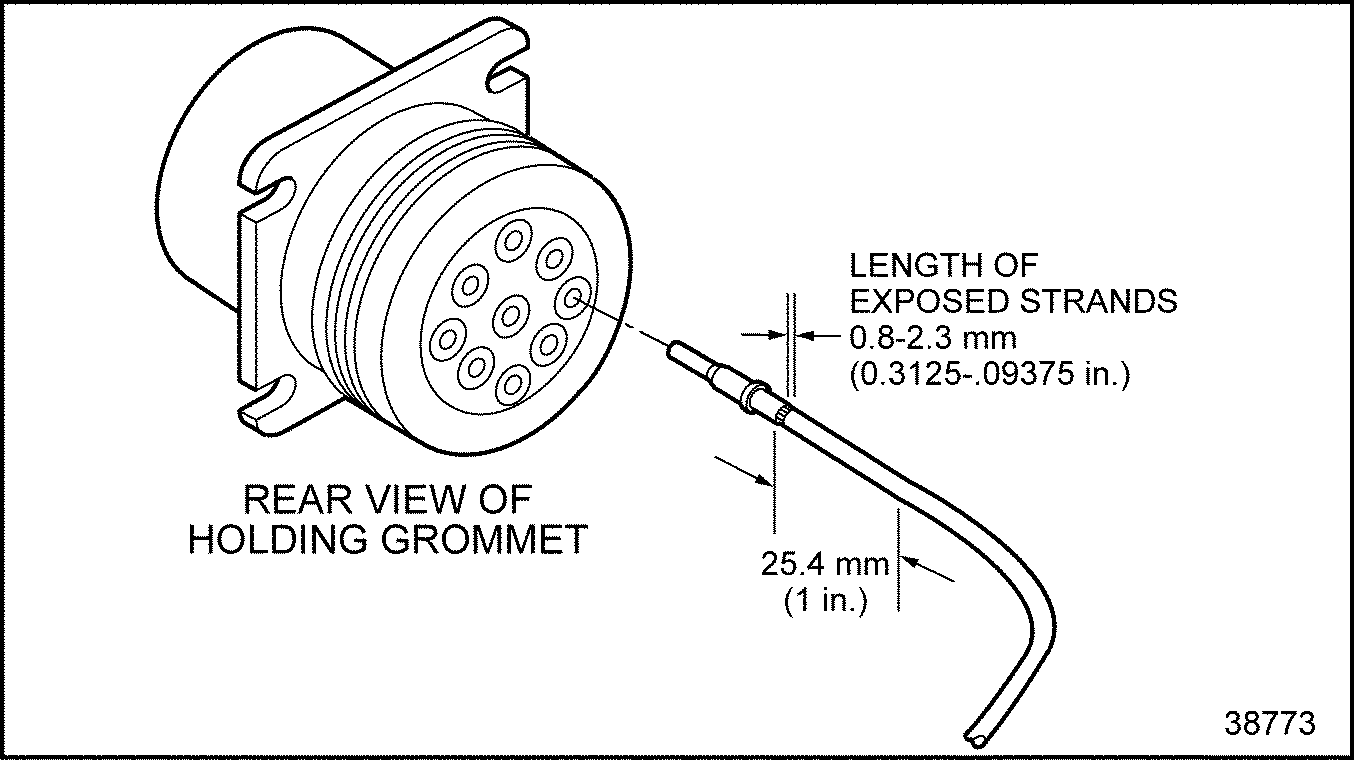
Figure 5. Pushing Terminal Into Grommet
- Push the terminal into the grommet until a positive stop is felt. See Figure "Pushing Terminal Into Grommet " . A slight tug will confirm that it is properly locked into place. See Figure "Locking Terminal Into Connector" .
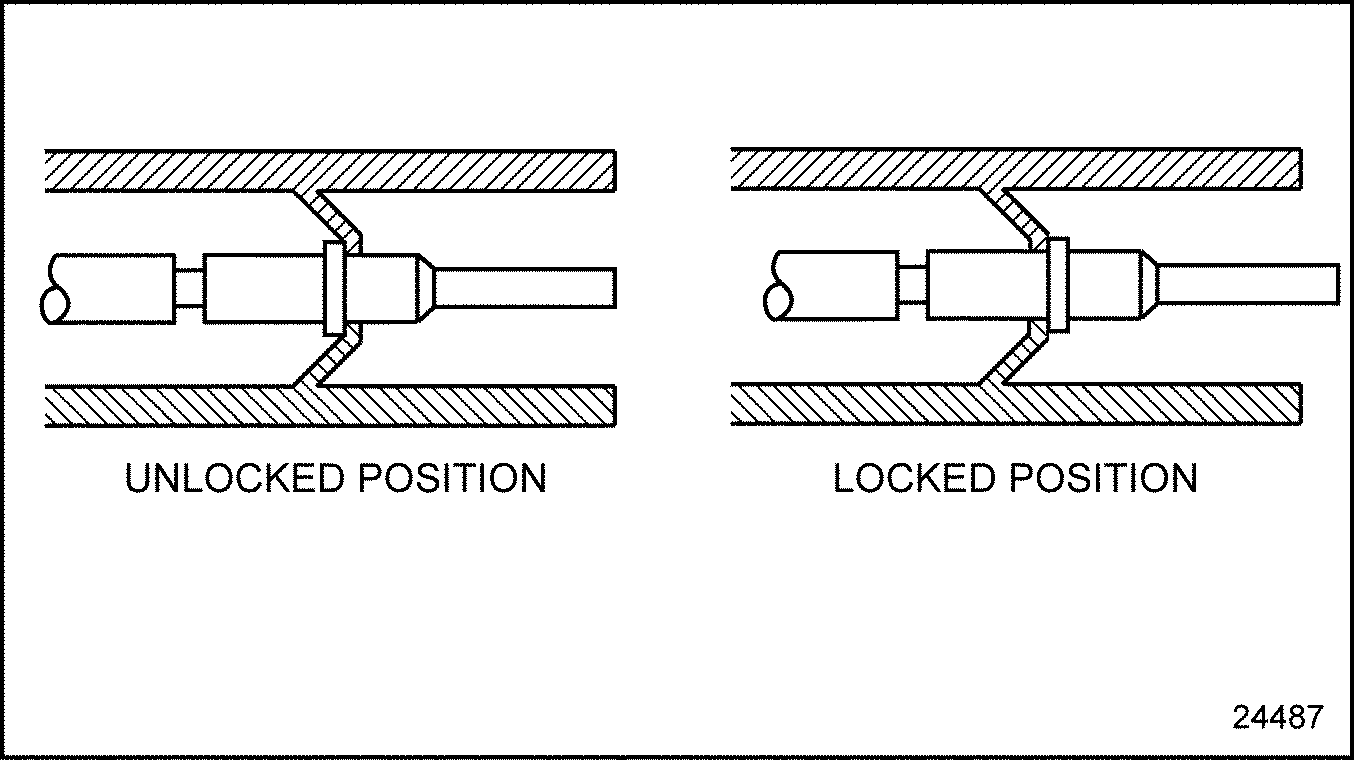
Figure 6. Locking Terminal Into Connector
Section 17.3.2.4
Deutsch Terminal Removal
The appropriate size removal tool should be used when removing wires from connectors. The proper removal tools are listed in Table "Removal Tools for Deutsch Terminals" .
|
Tool |
Kent-Moore Part Number |
|
Removing (12 AWG) |
J 37451 |
|
Removing (16-18 AWG) |
J 34513-1 |
Remove Deutsch terminals as follows:
- With the rear insert toward you, snap the appropriate size remover tool over the wire of the terminal to be removed. See Figure
"Removal Tool Position"
.
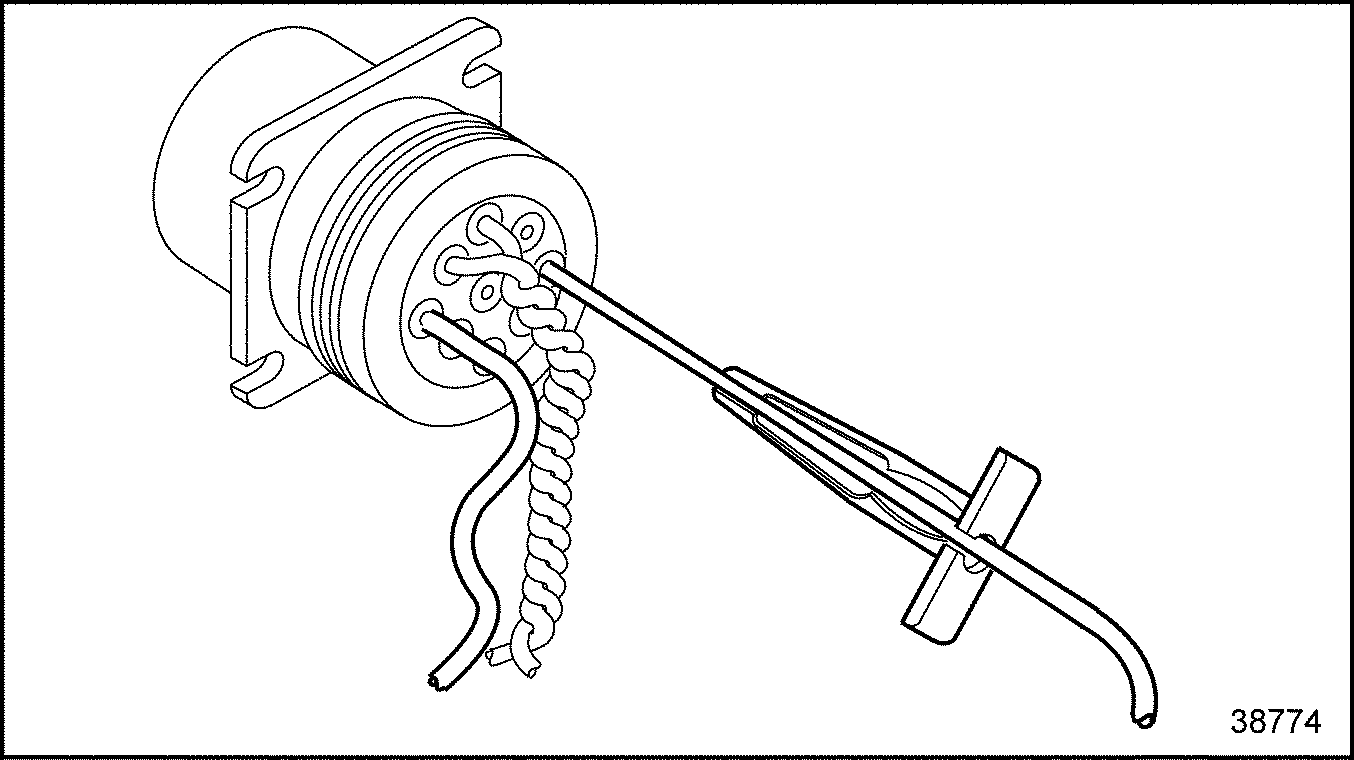
Figure 7. Removal Tool Position
- Slide the tool along the wire into the insert cavity until it engages and resistance is felt. Do not twist or insert tool at an angle. See Figure
"Removal Tool Insertion"
.
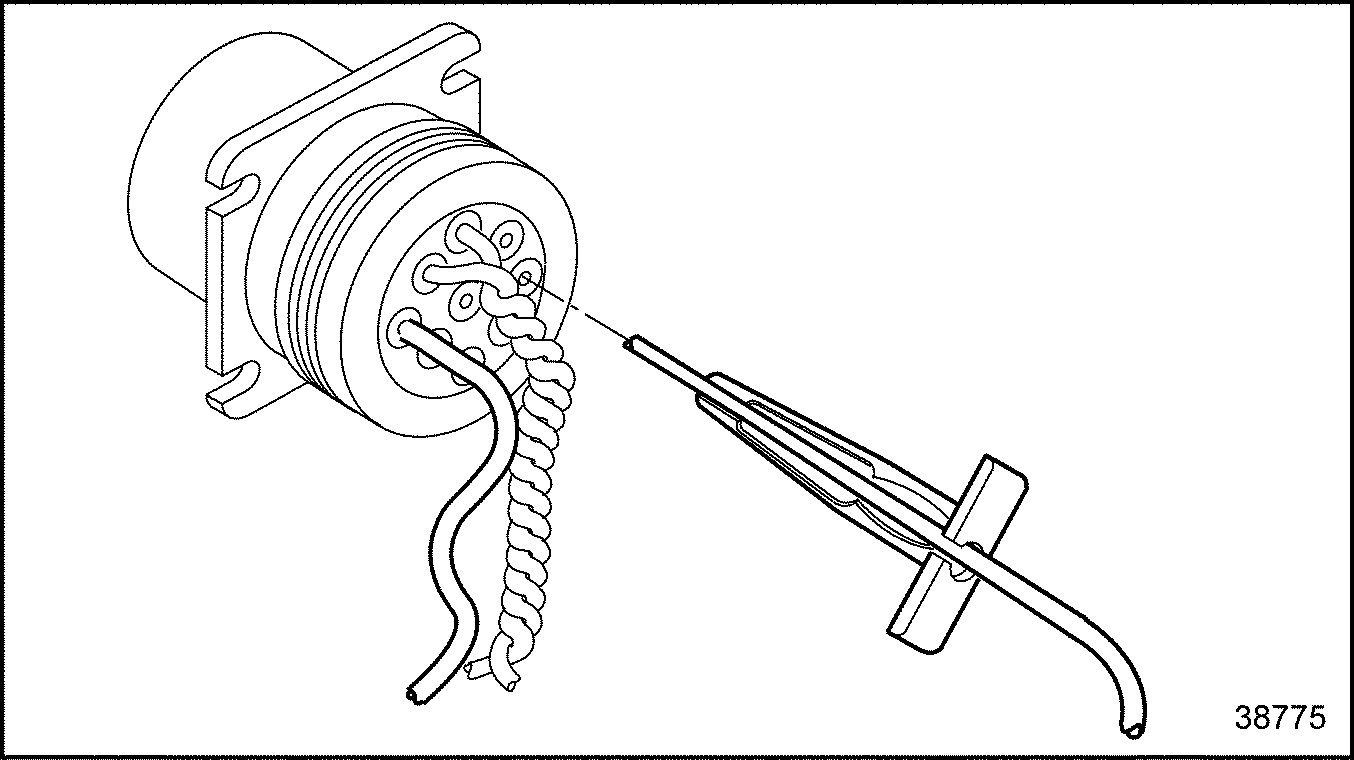
Figure 8. Removal Tool Insertion
- Pull terminal wire assembly out of the connector. Keep reverse tension on the wire and forward tension on the tool.
Section 17.3.3
ECM/ECU CONNECTOR WIRE INTO SHROUD INSTALLATION
The following procedures for using tape, ties, and conduit must be followed to enusre proper placement of the shroud over the ECM/ECU connectors:
- Use heavy electrical tape where wires exit conduit into the shroud (see Figure
"Bottom View of Shroud, ECM/ECU Connector and Conduit"
, A).
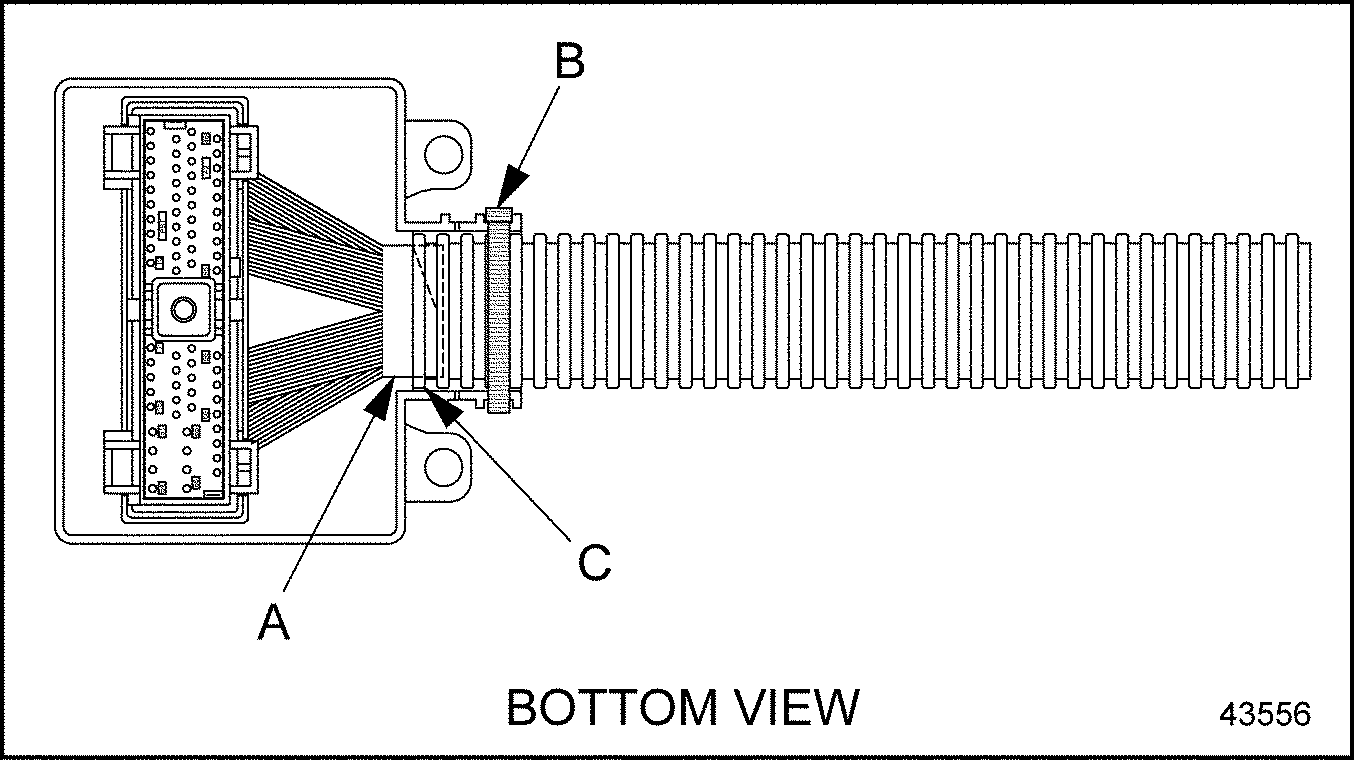
Figure 9. Bottom View of Shroud, ECM/ECU Connector and Conduit
- Use a tie strap to secure the shroud to the conduit and connector (see Figure "Bottom View of Shroud, ECM/ECU Connector and Conduit" , B).
- Check that the conduit extends past the innermost ring on the shroud inlet. The conduit must extend this far (see Figure "Bottom View of Shroud, ECM/ECU Connector and Conduit" , C).
- The two locking tabs in the shroud furthest from the wire inlet must be securely latched into the connector. The two tabs closest to the wire inlet should be snapped over the connector tabs (see Figure
"Shroud Tabs"
).
Figure 10. Shroud Tabs
- Ensure that the wires are not pinched between the connector and any of the shroud's protrusions during assembly (see Figure
"Side View of Shroud, ECM/ECU Connector and Conduit"
, D).
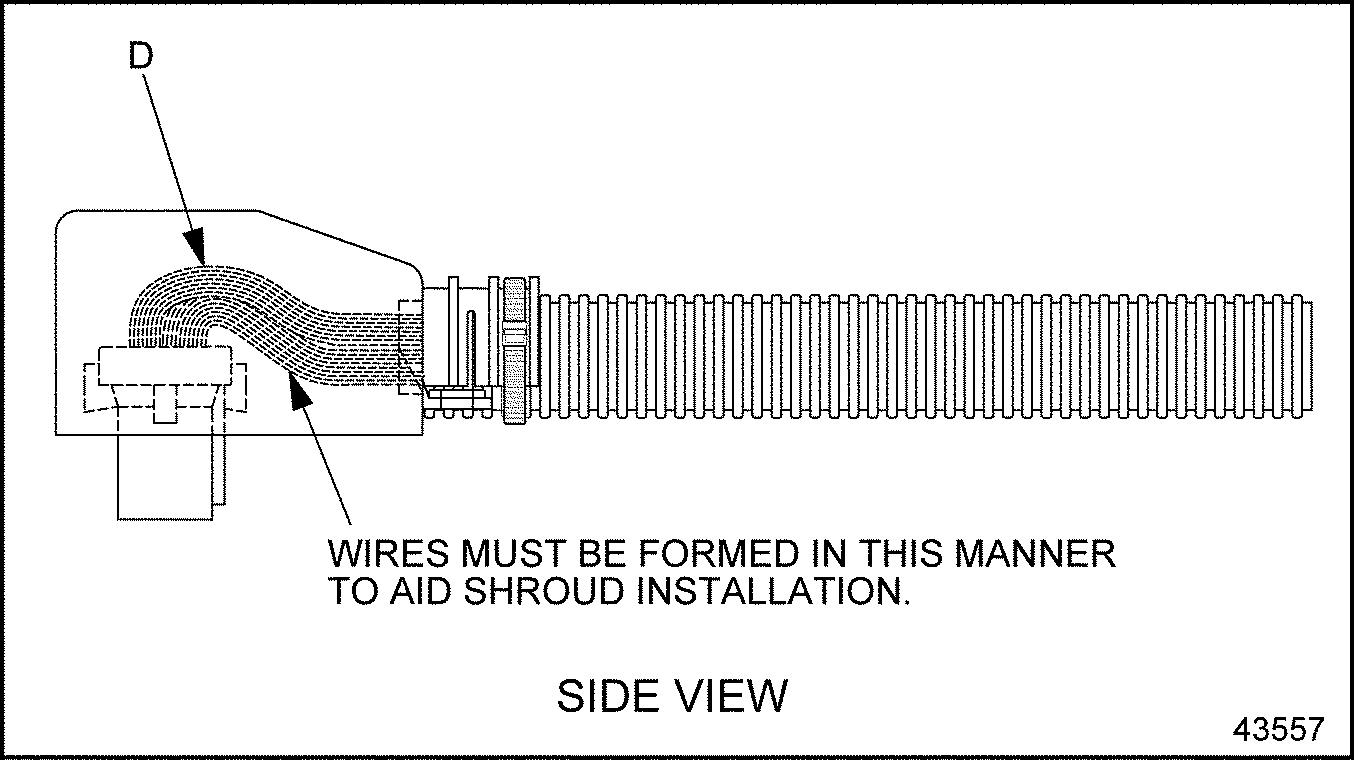
Figure 11. Side View of Shroud, ECM/ECU Connector and Conduit
Section 17.3.4
FCI APEX Terminal Installation And Removal
The following sections cover FCI APEX male and female terminal installation and removal.
Section 17.3.4.1
FCI Apex Male Terminal Installation
Install the FCI APEX male terminal as follows:
- Determine if the connector is new or used.
- If the connector is new, the red Terminal Position Assurance (TPA) is in an unlocked position so go to step 2 .
- If the connector is used, pull the TPA out (see Figure "Installing the FCI Male Terminal" ).
- Insert the crimped terminal into the connector until it clicks (see Figure
"Installing the FCI Male Terminal"
). The orientation of the terminal is not critical.
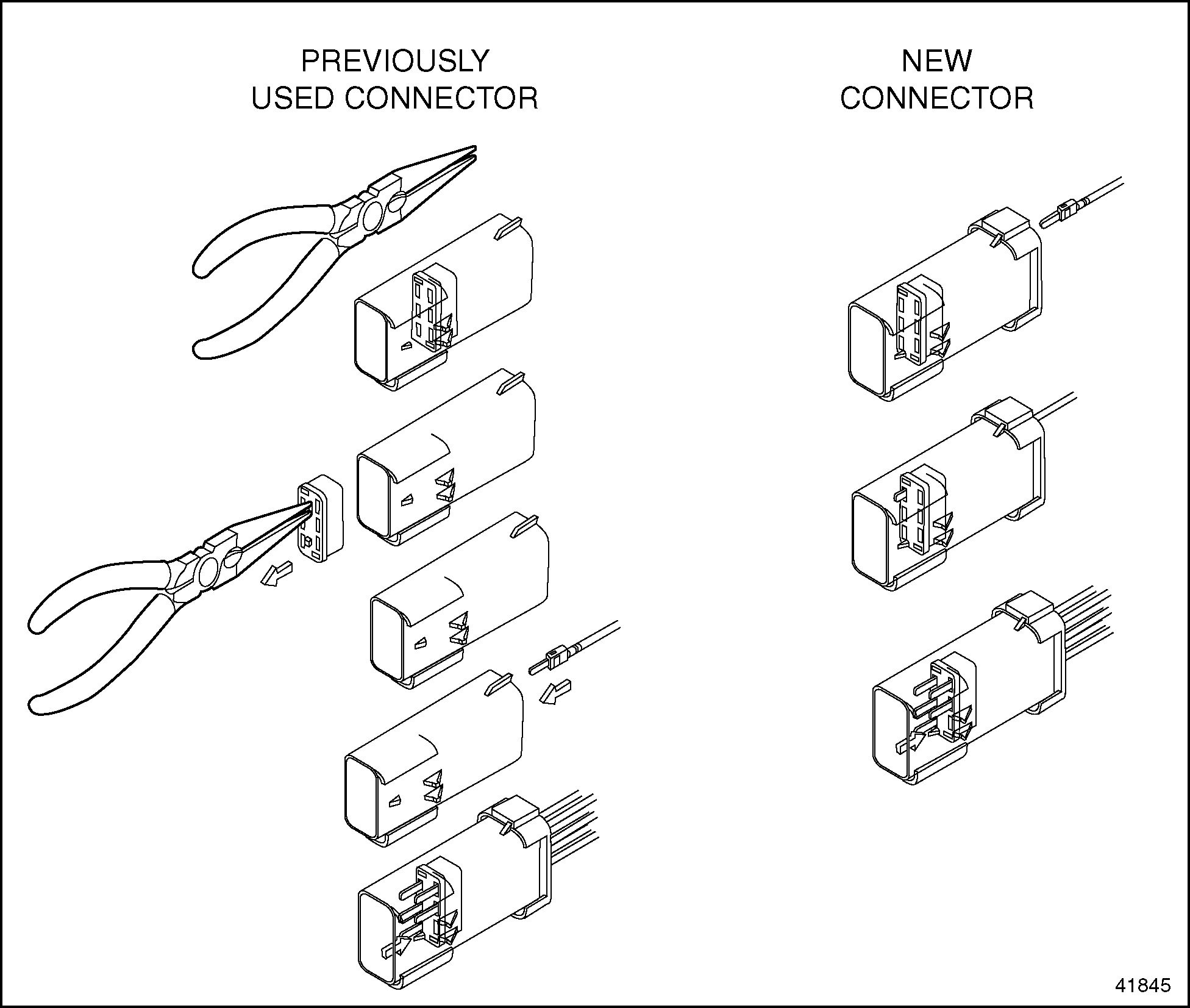
Figure 12. Installing the FCI Male Terminal
- Push the TPA into the locked (fully seated) position.
Note: The TPAs will self lock when the connectors are mated.
Section 17.3.4.2
FCI Apex Male Terminal Removal
Remove the terminal as follows:
- Using pliers pull out the red Terminal Position Assurance (TPA) (see Figure
" Removing the Terminal"
).
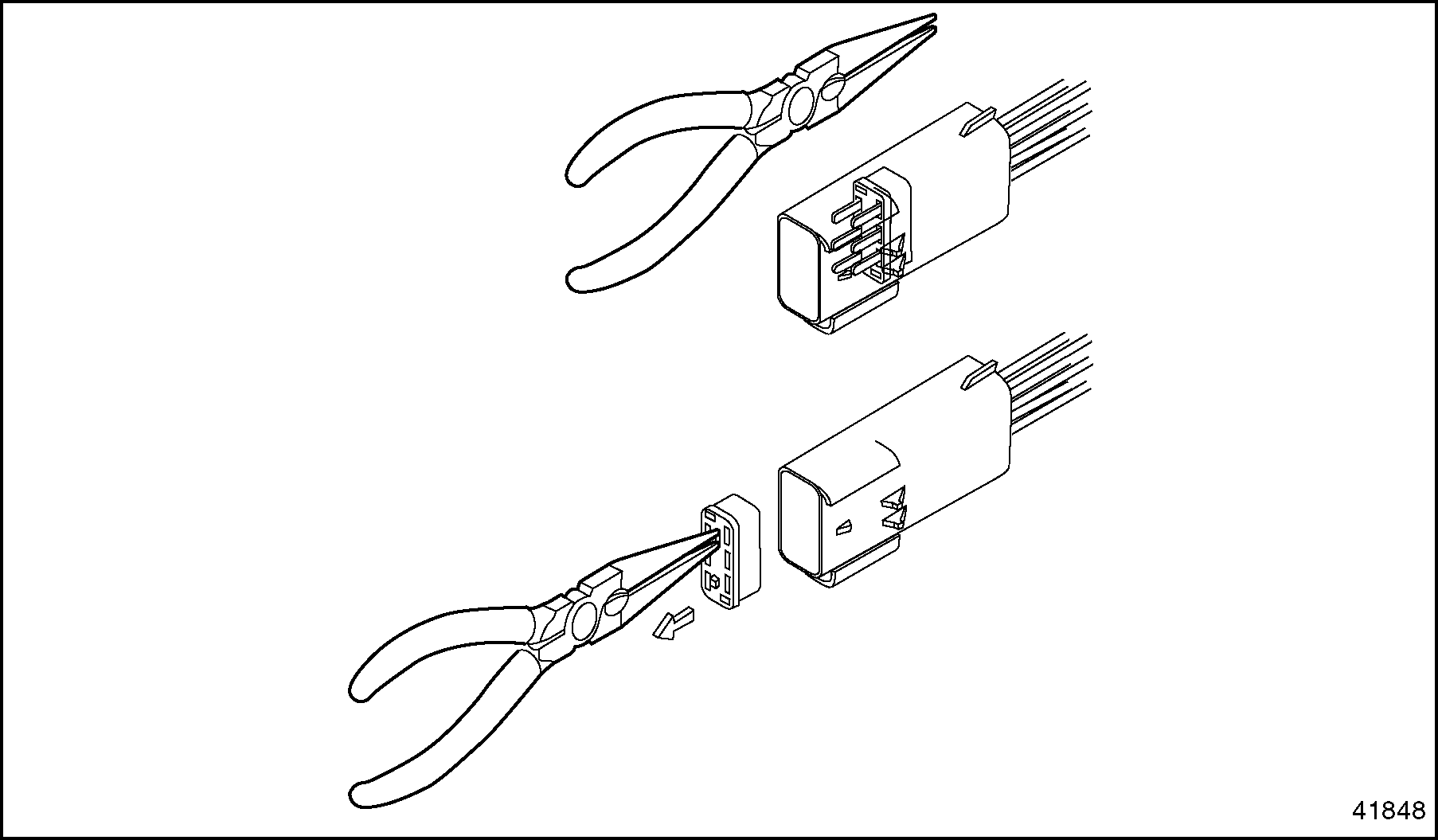
Figure 13. Removing the Terminal
- Using a FCI APEX repair tool (P/N: 54900002) or a #2 jeweler's screwdriver, press back the terminal locking tang (see Figure
"Pressing the Locking Tang"
).
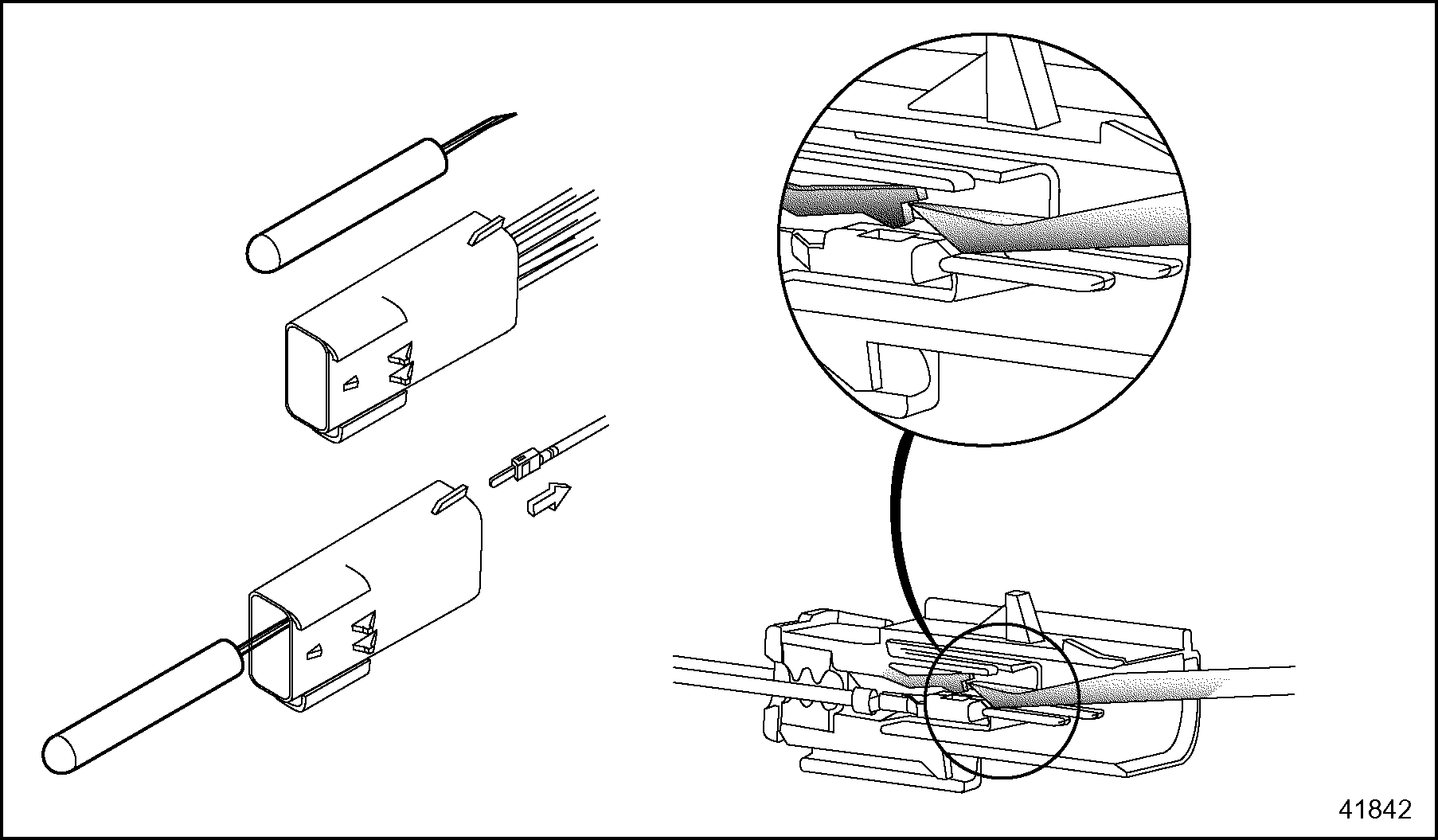
Figure 14. Pressing the Locking Tang
- Pull the cable back through the connector (see Figure " Removing the Terminal" ).
Section 17.3.4.3
FCI Apex Female Terminal Installation
Install the terminal as follows:
- Determine if the connector is new or used.
- If the connector is new, the blue Terminal Position Assurance (TPA) is in an unlocked position so go to .
- If the connector is used, pull the TPA out (see Figure "Installing the Terminal" ).
- Insert the crimped terminal into the connector until it clicks (see Figure
"Installing the Terminal"
).
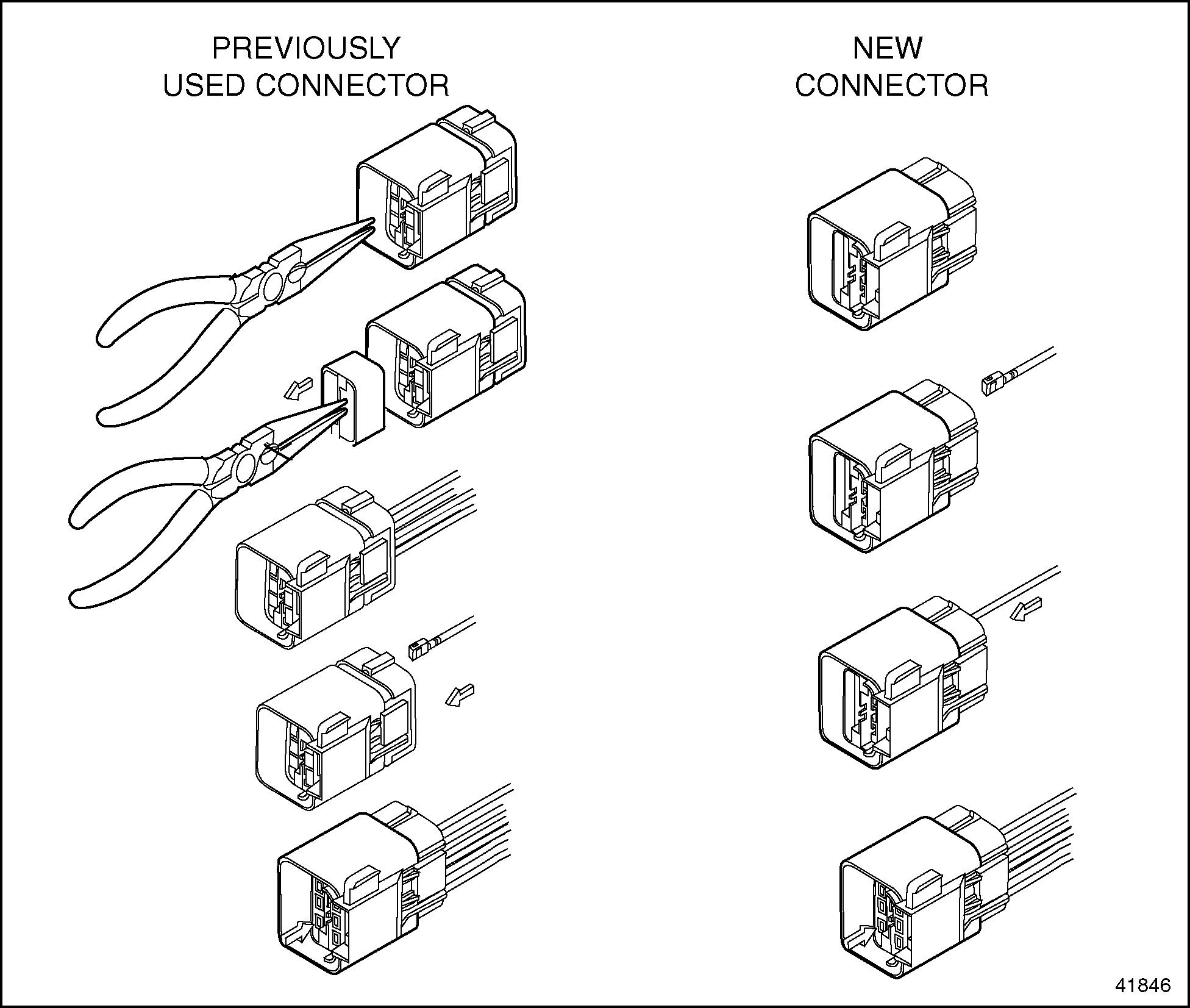
Figure 15. Installing the Terminal
- Push the TPA into the locked (fully seated) position.
Note: The TPAs will self lock when the connectors are mated.
Section 17.3.4.4
FCI Apex Female Terminal Removal
Remove the terminal as follows:
- Using pliers pull out the blue Terminal Position Assurance (TPA) that is located inside the connector (see Figure
"Removing the Terminal"
).
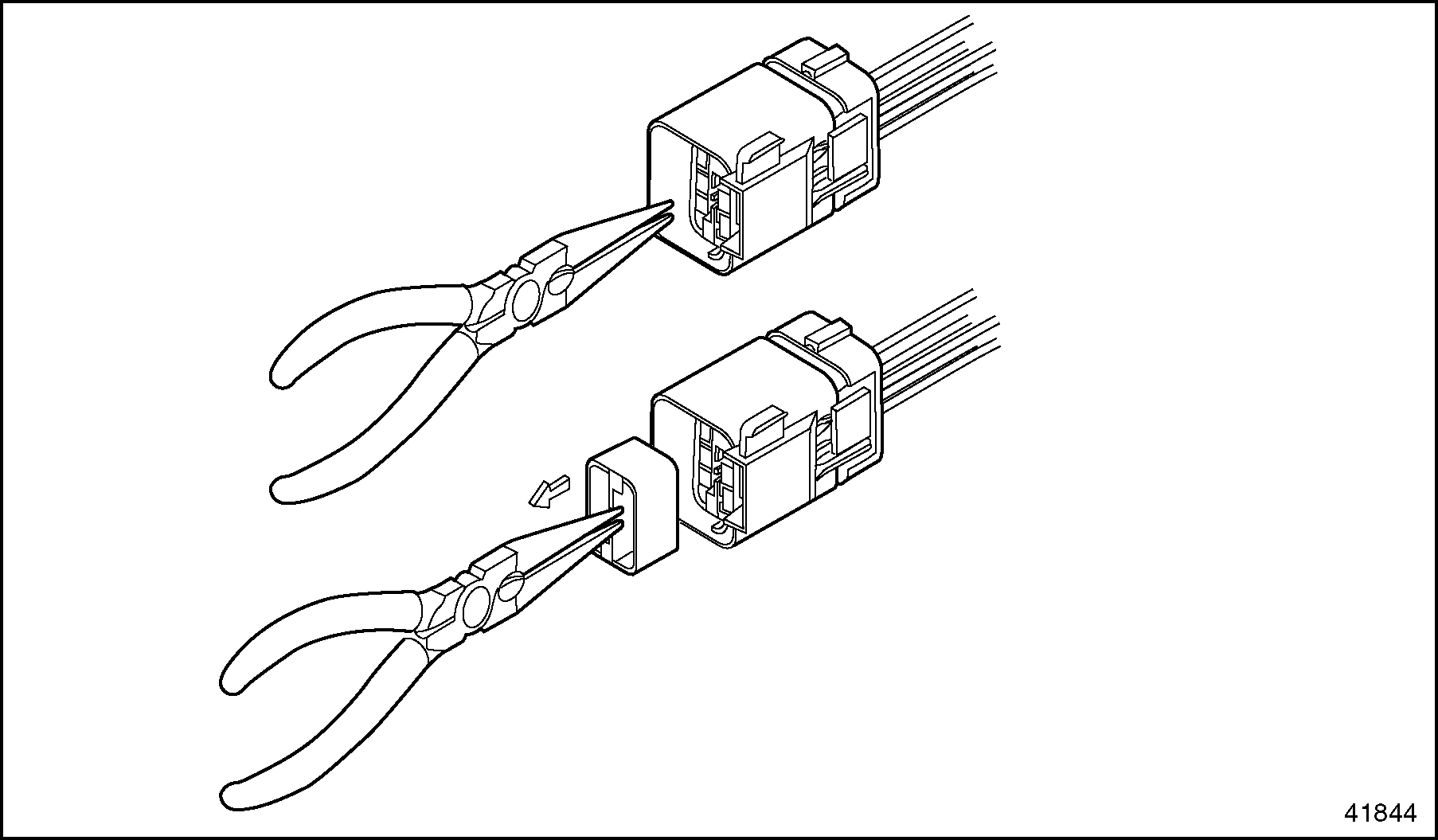
Figure 16. Removing the Terminal
- Using a FCI APEX repair tool (P/N: 54900002) or a #2 jeweler's screwdriver, press back the terminal locking tang (see Figure
"Pressing the Locking Tang"
).
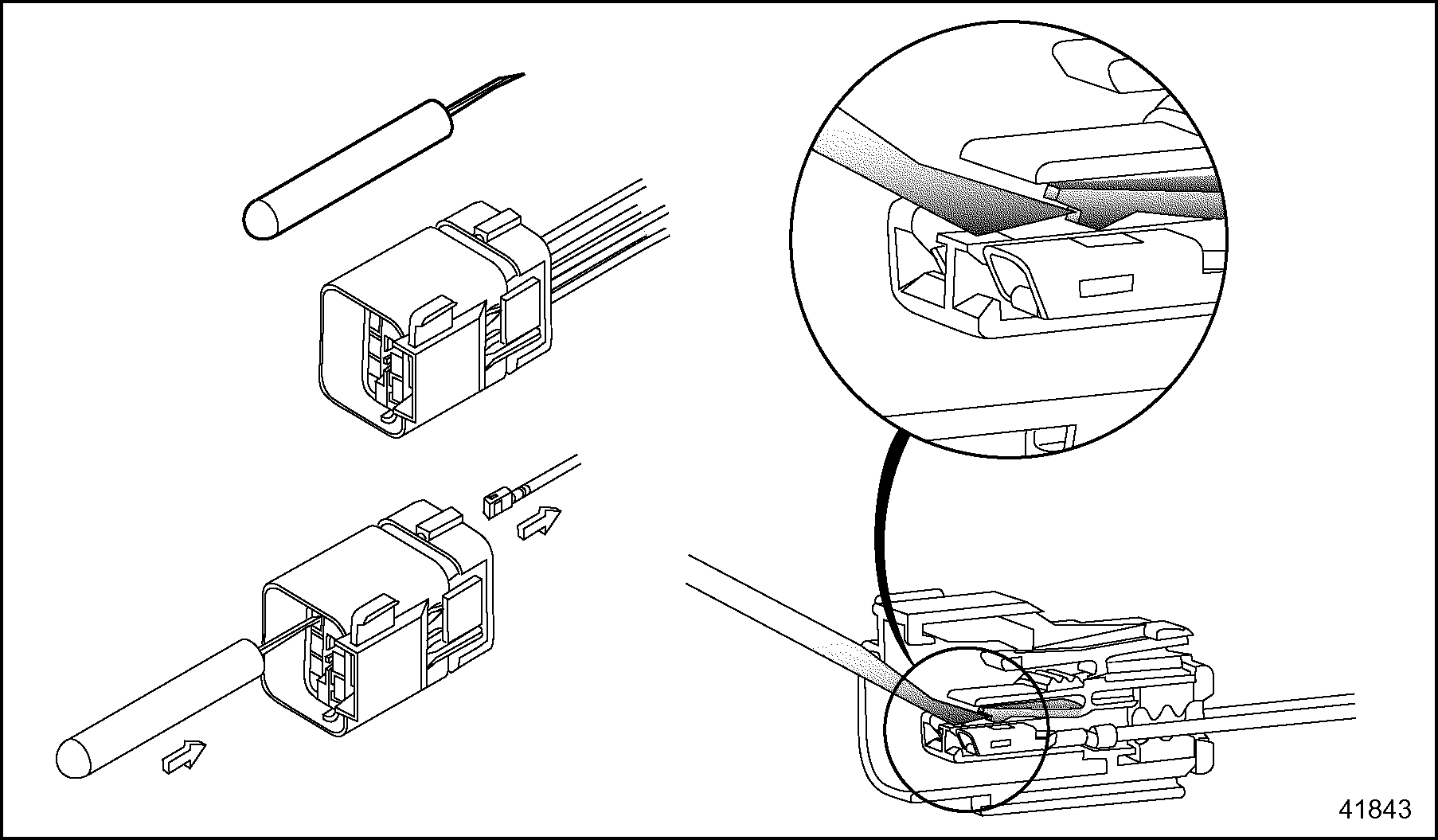
Figure 17. Pressing the Locking Tang
- Pull the cable back through the connector (see Figure "Removing the Terminal" ).
Section 17.3.5
Splicing Guidelines
The following are guidelines which may be used for splices. The selection of crimpers and splice connectors is optional. Select a high quality crimper equivalent to the Kent-Moore tool, J 38706, and commercially available splice clips.
The recommended technique for splicing and repairing circuits (other than power and ignition circuits) is a clipped and soldered splice. Alternatively, any method that produces a high quality, tight (mechanically and electronically sound) splice with durable insulation is considered to be acceptable.
Section 17.3.5.1
Criteria for Splicing Straight Leads
Observe the following :
- No more than one strand in a 16 strand wire may be cut or missing.
- Use Sn 60 solder with rosin core flux.
- The exposed wire must be clean before the splice is soldered.
Section 17.3.5.2
Clipped and Soldered Splicing Method
The tools required are listed in Table "Recommended Splicing Tools" .
|
Tool |
Part Number |
|
Heat Gun |
-- |
|
Sn 60 solder with rosin core flux |
-- |
|
Wire Stripper |
Kent-Moore J 35615 or equivalent |
|
Splice Clips (commercially available) |
Wire size dependent |
|
Heat Shrink Tubing |
Raychem HTAT or equivalent |
Soldering splice connectors is optional. To solder splice connectors:
- Position the leads, so one overlaps the other. See Figure
"Positioning the Leads"
.
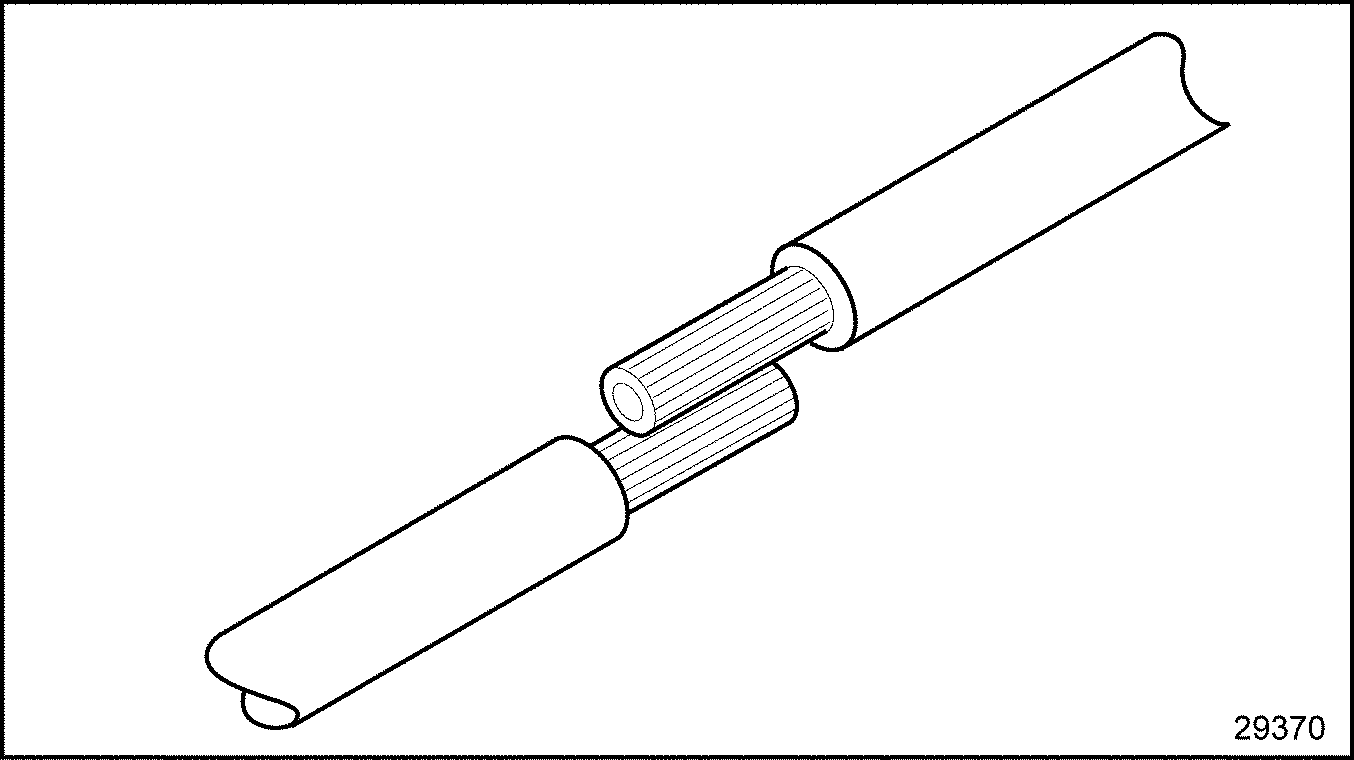
Figure 18. Positioning the Leads
- Secure the leads with a commercially available clip and hand tool. See Figure
"Securing the Leads With a Clip"
.
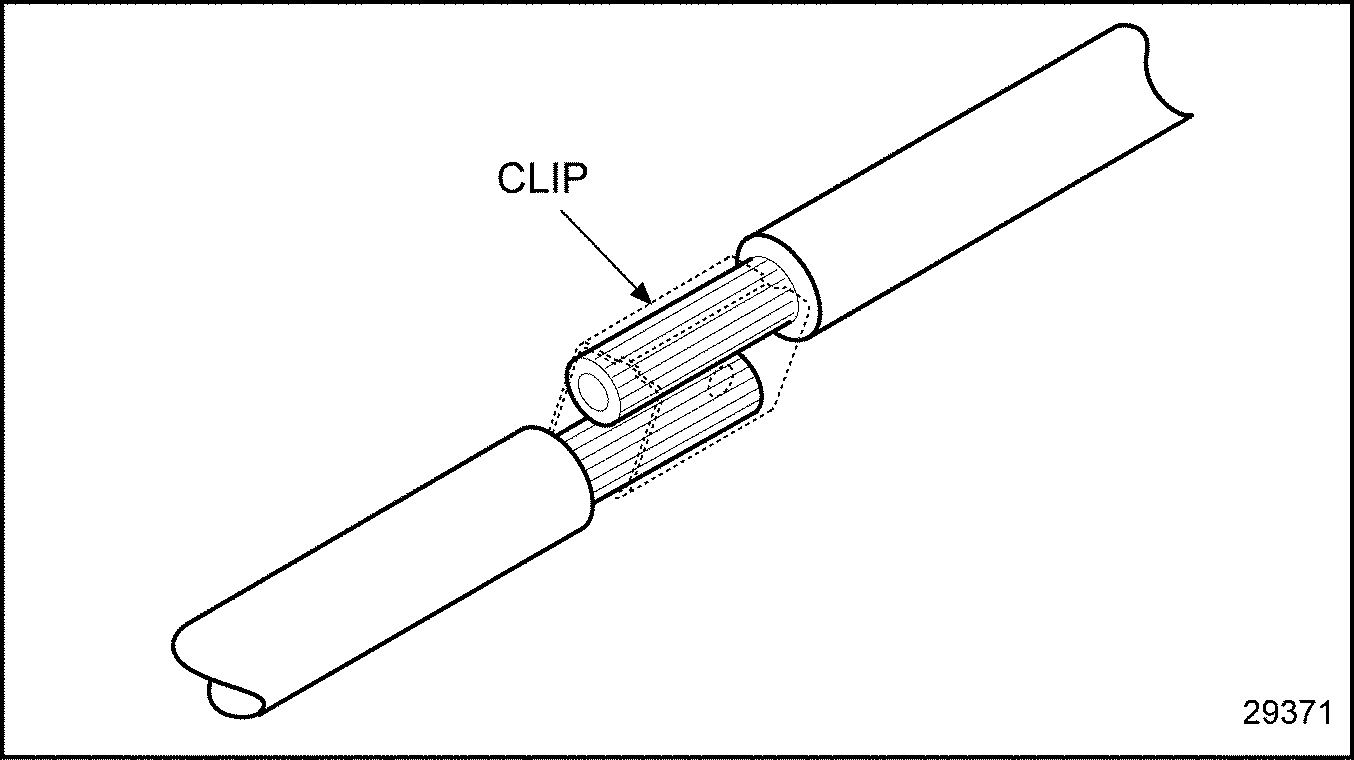
Figure 19. Securing the Leads With a Clip
- Use a suitable electronic soldering iron to heat the wires. Apply the solder to the heated wire and clip (not to the soldering iron) allowing sufficient solder flow into the splice joint.
- Pull on wire to assure crimping and soldering integrity and meet the criteria listed in Table
"Applied Load Criteria for Terminals"
.
Wire Gauge
Must Withstand Applied Load
14 AWG
45 lb (200 N)
16 AWG
27 lb (120 N)
18 AWG
20 lb (89 N)
Table 8. Applied Load Criteria for Terminals - Shrink wrap. Loop the lead back over the spliced joint and tape. See Figure "Recommended Strain Relief of Spliced Joint" .
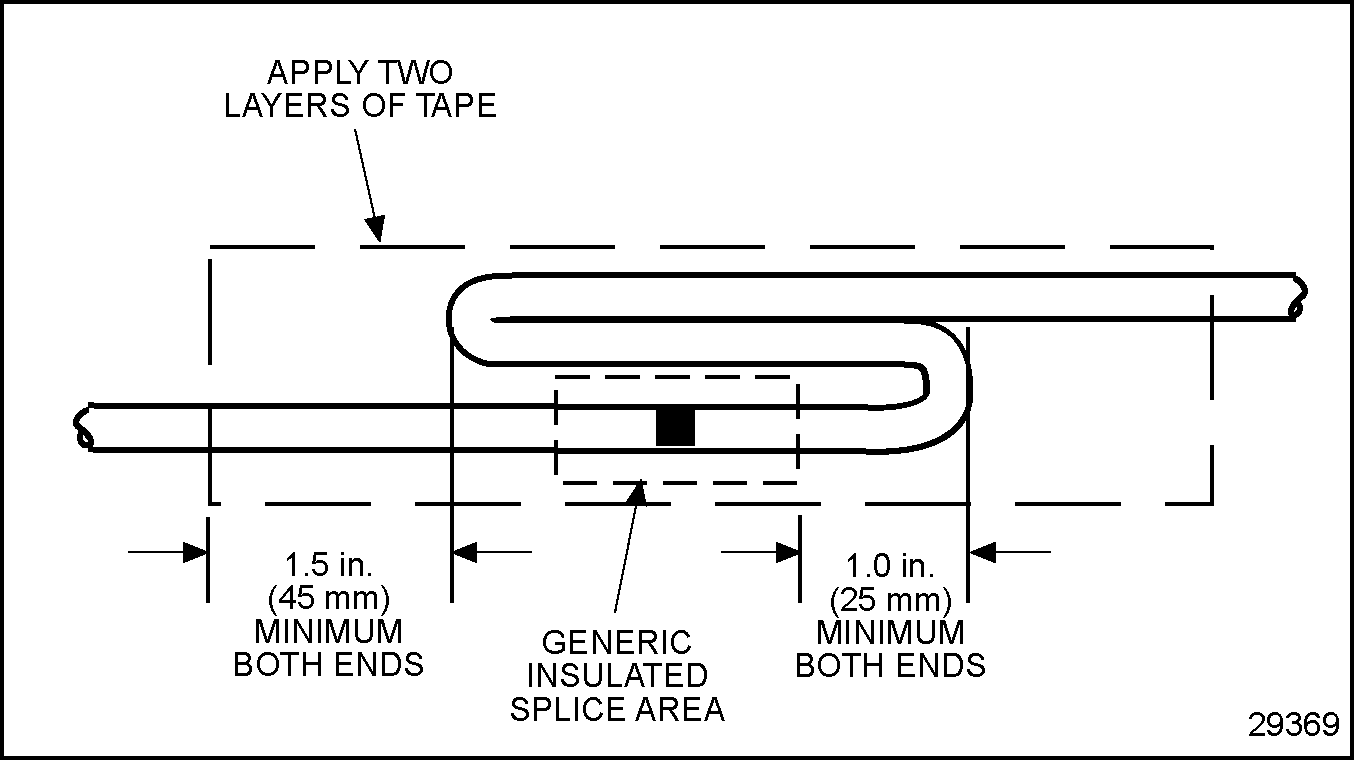
Figure 20. Recommended Strain Relief of Spliced Joint
Section 17.3.5.3
Splicing and Repairing Straight Leads - Alternate Method 1
The tools required are listed in Table "Recommended Splicing Tools" .
|
Tool |
Part Number |
|
Heat Gun |
-- |
|
Wire Stripper |
Kent-Moore J 35615 or equivalent |
|
Splice Clips (commercially available) |
Wire size dependent |
|
Heat Shrink Tubing |
Raychem HTAT or equivalent |
Note: No more than one strand in a 16 strand wire may be cut or missing.
The recommended method to splice straight leads follows:
- Locate broken wire.
- Remove insulation as required; be sure exposed wire is clean and not corroded.
-
Insert one wire into the splice clip until it butts against the clip. Stop and crimp (see Figure "Splicing Straight Leads - Alternate Method 1" , A).
-
Insert the other wire into the splice clip until it butts against the clip stop (see Figure "Splicing Straight Leads - Alternate Method 1" , B).
NOTICE:
Any terminal that is cracked or ruptured is unacceptable as malfunctions may occur.
- Visually inspect the splice clip for cracks, rupture, or other crimping damage. Remove and replace damaged clips before proceeding.
- Pull on wire to ensure the splice integrity. The criteria listed in Table
"Applied Load Criteria for Terminals"
must be met.
Wire Gage
Must Withstand Applied Load
14 AWG
45 lb (200 N)
16 AWG
27 lb (120 N)
18 AWG
20 lb (89 N)
Table 11. Applied Load Criteria for Terminals -
Shrink the splice clip insulative casing with a heat gun to seal the splice (see Figure "Splicing Straight Leads - Alternate Method 1" , C ).
- Loop the lead back over the spliced joint and tape. See Figure "Recommended Strain Relief of Spliced Joint" .
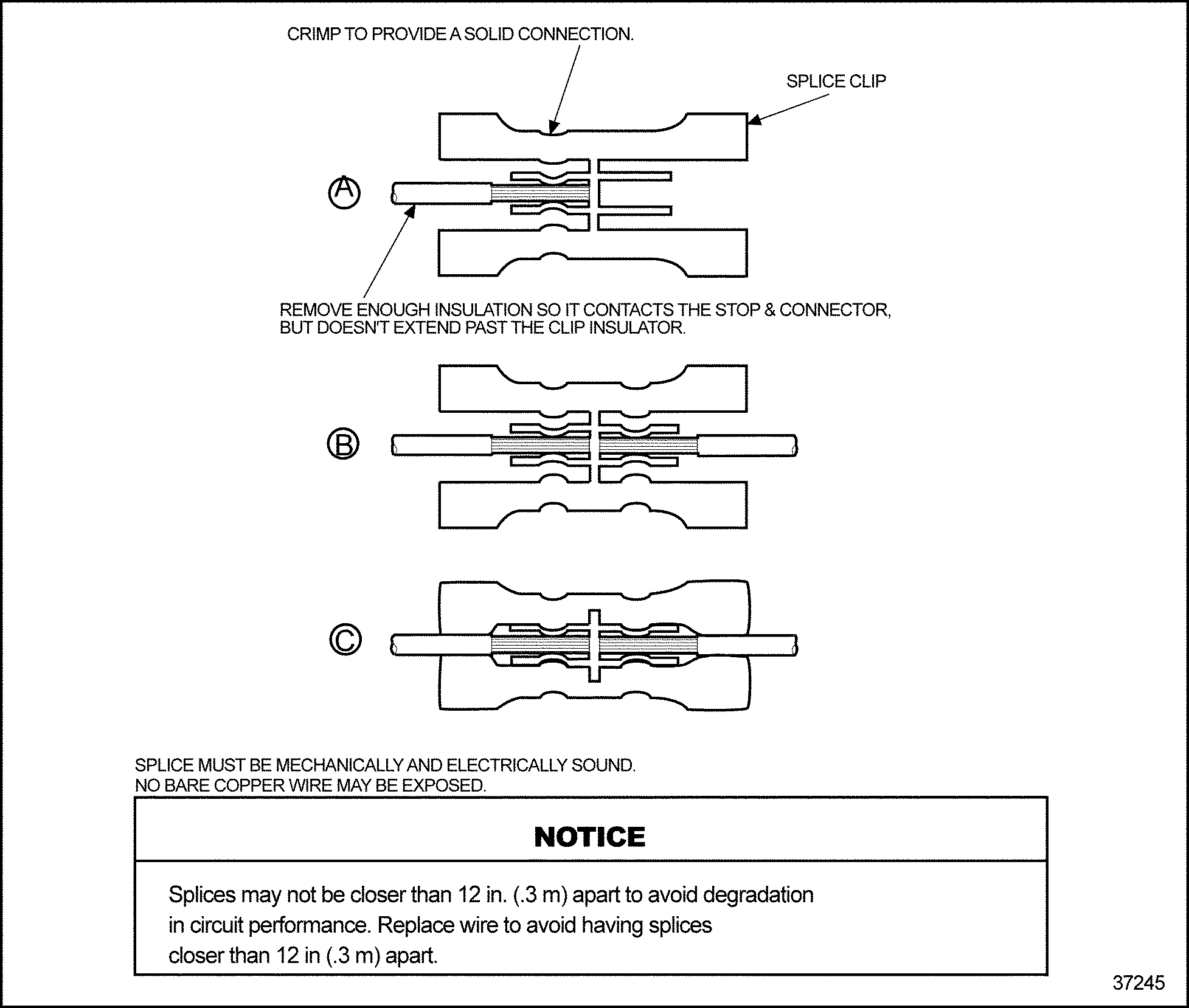
Figure 21. Splicing Straight Leads - Alternate Method 1
Section 17.3.5.4
Splicing and Repairing Straight Leads - Alternate Method 2
This method is not allowed or recommended for power, ignition, or injector circuits. The tools required are listed in Table "Recommended Splicing Tools" .
|
Tool |
Part Number |
|
Heat Gun |
-- |
|
Wire Stripper |
Kent-Moore J 35615 or equivalent |
|
Splice Clips (commercially available) |
Wire size dependent |
|
Heat Shrink Tubing |
Raychem HTAT or equivalent |
Note: No more than one strand in a 16 strand wire may be cut or missing.
An acceptable option for splicing straight leads is:
- Locate broken wire.
- Remove insulation as required; be sure exposed wire is clean and not corroded.
-
Slide a sleeve of glue lined, shrink tubing (Raychem HTAT or equivalent) long enough to cover the splice clip on the wire and overlap the wire insulation, about ¼ in. (6 mm) on both sides (see Figure "Splicing Straight Leads - Alternate Method 2" , A).
-
Insert one wire into splice clip until it butts against the splice clip. Stop and crimp (see Figure "Splicing Straight Leads - Alternate Method 2" , B).
-
Insert the remaining wires into the splice clip one at a time until each butts against the splice clip; stop and crimp (see Figure "Splicing Straight Leads - Alternate Method 2" , B).
NOTICE:
Any terminal that is cracked or ruptured is unacceptable as malfunctions may occur.
- Visually inspect the terminal for cracks, rupture, or other crimping damage. Remove and replace damaged terminal before proceeding.
-
Slide the shrink tubing over the crimped splice clip (see Figure "Splicing Straight Leads - Alternate Method 2" , C ).
- Shrink tubing with a heat gun to seal the splice (see Figure
"Splicing Straight Leads - Alternate Method 2"
, D).
NOTICE:
A minimum of two layers of heat shrink tubing must be applied to splices that have more than one lead in or out.
- Loop the lead back over the spliced joint and tape. See Figure "Recommended Strain Relief of Spliced Joint" .
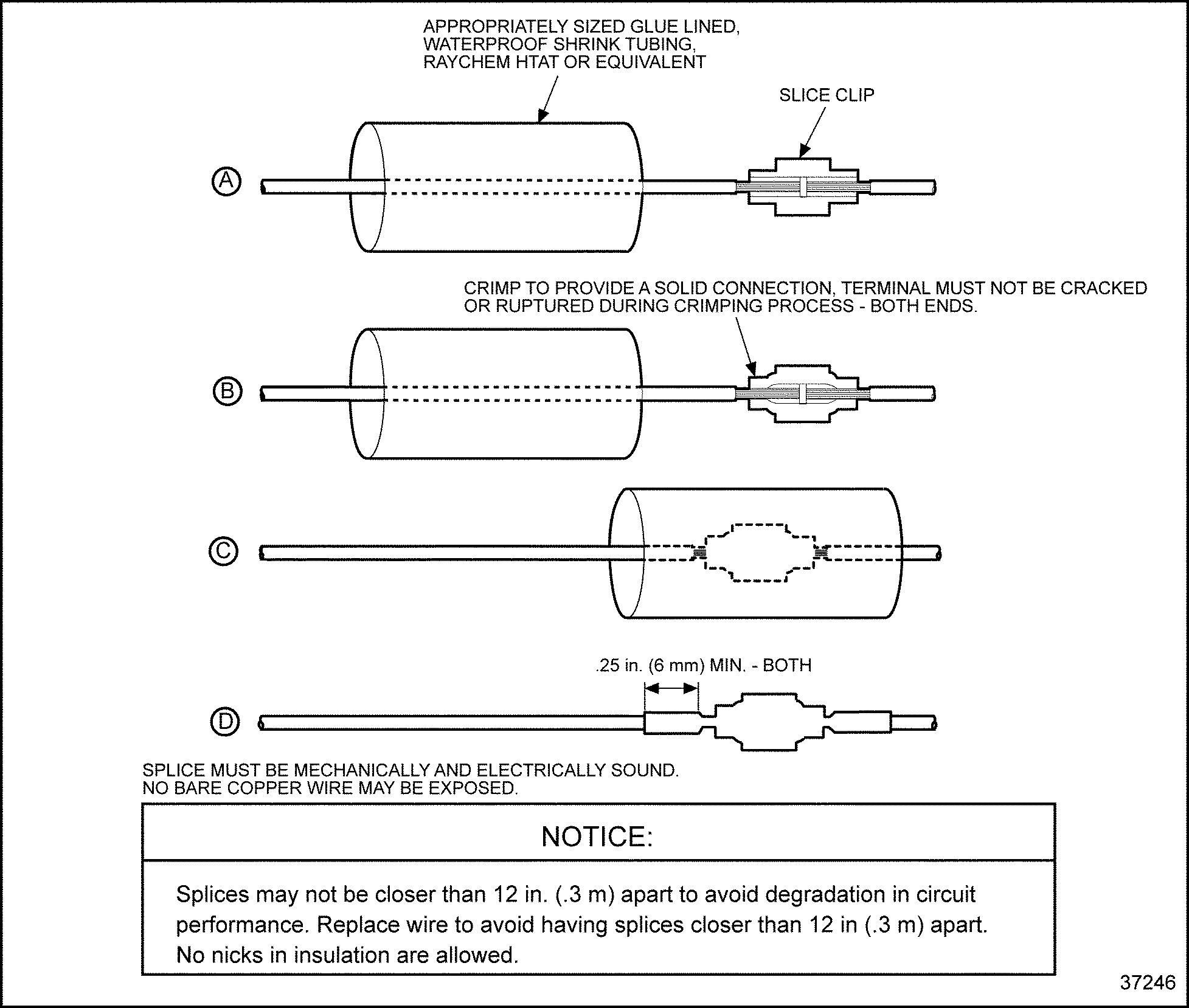
Figure 22. Splicing Straight Leads - Alternate Method 2
Section 17.3.5.5
Shrink Wrap
Shrink wrap is required when splicing non insulated connections. Raychem HTAT or any equivalent heat shrink dual wall epoxy encapsulating adhesive polyolefin is required. Shrink wrap must extend at least .25 in. (6 mm) over wire insulation past splice in both directions.
To heat shrink wrap a splice:
NOTICE: |
|
The heat shrink wrap must overlap the wire insulation about .25 in. (6 mm) on both sides of the splice. |
- Select the correct diameter to allow a tight wrap when heated.
- Heat the shrink wrap with a heat gun; do not concentrate the heat in one location, but apply the heat over the entire length of shrink wrap until the joint is complete.
- Repeat step 2 to apply a second layer of protection (if required by splicing guidelines).
Section 17.3.5.6
Staggering Wire Splices
Position spliced wires properly as follows:
NOTICE: |
|
You must stagger positions to prevent a large bulge in the harness and to prevent the wires from chafing against each other. |
- Stagger the position of each splice (see Figure
"The Correct and Incorrect Method of Staggering Multiple Splices"
) so there is at least a 2.5 in. (63.5 mm) separation between splices.
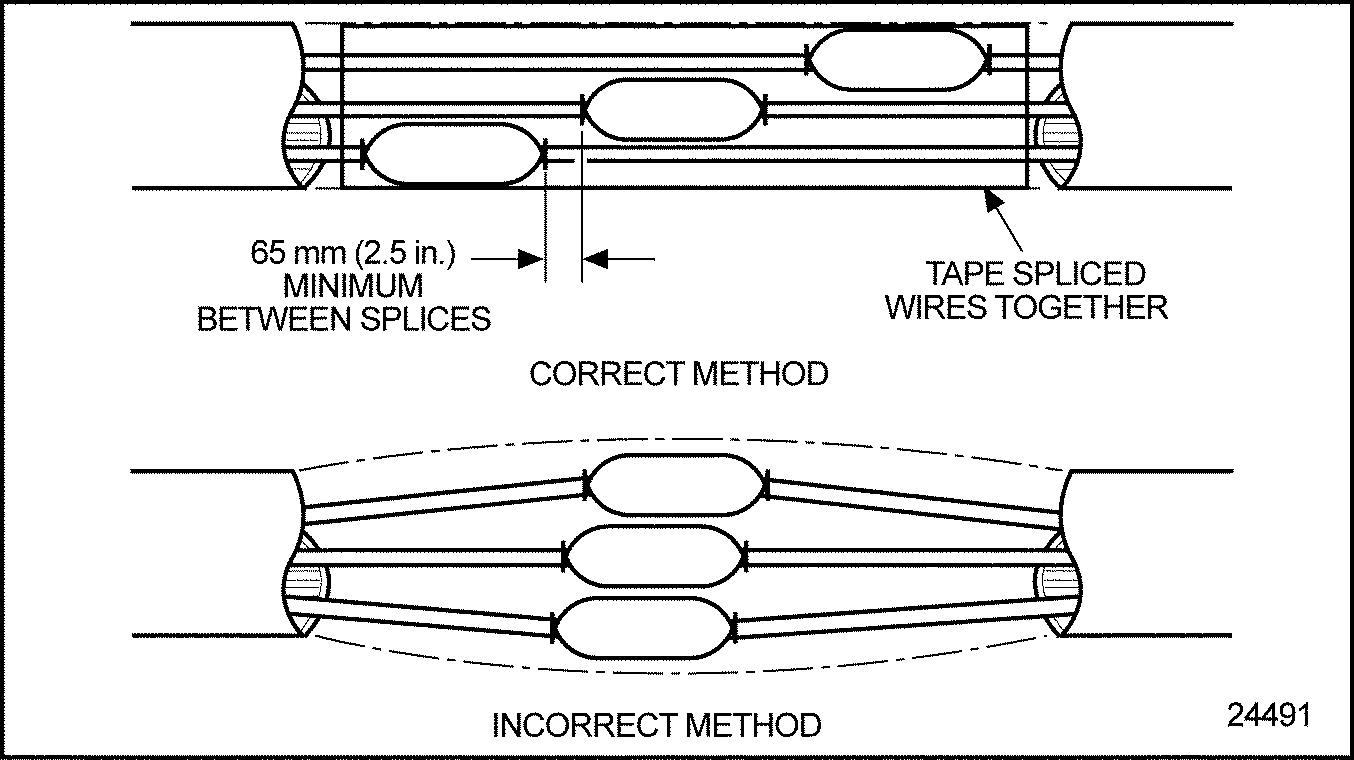
Figure 23. The Correct and Incorrect Method of Staggering Multiple Splices
NOTICE:
A minimum of two layers of heat shrink tubing extending 0.25 in.
(6 mm) past the splice must be used to complete the splice.
- Heat shrink a minimum of two layers of heat shrink tubing.
- Tape the spliced wires to each other. Refer to "17.4 Conduit and Loom" .
| Series 60 DDEC V Troubleshooting Guide - 6SE570 |
| Generated on 10-13-2008 |